
Have you ever found yourself in that frustrating situation? You’re scrolling through social media, watching a video, or trying to send an important message, and suddenly… your data runs out.
The dreaded pop-up appears, your connection drops, and you’re left disconnected. The cost of mobile data can be a huge burden, making it seem impossible to stay online all the time.
But what if I told you there’s a solution that is safe, reliable, and completely free—without the hassle of downloading and managing complex configuration files?
In this blog post, I’m going to introduce you to Maya Tun Pro, a revolutionary free VPN app that is changing how people access the internet. I’ll walk you through exactly what it is, how it works, and a simple, step-by-step guide to get you connected.
My goal is to equip you with the knowledge to get online for free, but also to help you understand the technology behind it so you can stay safe and smart.
What is Maya Tun Pro and Why is it Different?
Maya Tun Pro is a powerful VPN (Virtual Private Network) application designed to give you secure and unrestricted internet access. Unlike many other free internet apps, its primary feature is that it works right out of the box with “built-in configurations.” This means you don’t have to search for, download, or import any external .maya, .ehi or .hat files.
This is a game-changer because it simplifies the process and significantly reduces the risk of downloading malicious files from unverified sources. The app is all you need.
The core of Maya Tun Pro’s strength lies in its ability to bypass network restrictions using specialized protocols, making it a reliable choice for accessing the internet without a data bundle. This is why it has become so popular in regions with high data costs.
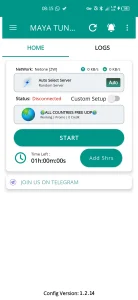
MAYA TUN UDP VPN: The Technology Behind the Magic
At the heart of Maya Tun Pro’s free internet access is its support for various tunneling protocols, including the highly effective MAYA TUN UDP VPN. UDP, or User Datagram Protocol, is a lightweight protocol that is perfect for fast, real-time communication.
For VPNs, it’s often used to create a “tunnel” that can slip past network firewalls and data caps, allowing you to access the internet even when you don’t have a data plan.
This is different from other protocols that might be slower or more easily detected. By using UDP, Maya Tun Pro can often provide a more stable and faster connection for activities like browsing and streaming, ensuring a smoother user experience.
Getting Started: Maya Tun Pro on Your Device
One of the biggest advantages of Maya Tun Pro is its cross-platform availability. The developers have made it easy for you to get the app, no matter what kind of device you are using.
Maya Tun Pro for Android
If you’re an Android user, you can easily download the official and secure version of Maya Tun Pro directly from the Google Play Store. I always recommend getting apps from official stores to ensure you are downloading a legitimate and safe version.
The Play Store’s built-in security features offer peace of mind against malware and viruses.
For those who may be in a region where the Play Store is not easily accessible, the app is also available as a MAYA TUN core VPN APK. While this option exists, remember to only download APKs from trusted sources. Using the official Play Store link is always the safest method.
Maya Tun Pro for iOS (on App Store)
The developers have also made Maya Tun Pro available for Apple users. You can find the official app on the App Store, which provides the same reliable service and security as the Android version. This ensures that a wide range of users can benefit from free internet access regardless of their device.
Your Step-by-Step Guide to Free Internet
Now for the part you’ve been waiting for! I’ll show you how to set up Maya Tun Pro to get free internet in just a few simple steps. The beauty of this process is that you don’t need to manually configure anything or search for a file. The app does all the heavy lifting for you.
Maya Tun Pro VPN Settings 2026 (for 2025)
The settings for Maya Tun Pro are designed to be intuitive. While the app automatically updates, here is a general overview of the steps and settings you’ll encounter in 2025.
- Download the App: Click the download button below to get the official app.
- Install: Once downloaded, install the app on your device.
- Update Built-In Configs: Open the app and let it update its built-in configurations. This usually happens automatically on the first launch.
- Choose a Random Server: Select a random server from the list. The app is smart enough to find the best working server for your network.
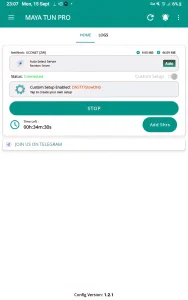
- Enable Custom Setup: Navigate to the settings and enable the “Custom Setup” option.
- Choose DNSTT/SlowDNS: Within the custom settings, select the DNSTT or SlowDNS protocol. This is crucial for bypassing network restrictions.
- Connect: Tap the “Connect” button and wait for the app to establish a connection.
- Enjoy: Once connected, you can enjoy free internet access!
It’s that simple! There’s no need to paste in any file or manually input complex settings.
Maya Tun Pro: Your 8-Step Guide
Get started with free internet access in minutes.
Scroll to the right
How to Download Configs from Our Website (The Easy Way)
While Maya Tun Pro is great because it doesn’t require files, many other popular free internet apps, such as Ha Tunnel Plus and Stark VPN, do. On this website, I make it simple and safe for you to get the files you need.
Here is how you can download config files from our site:
- Click the Download Button: Find the download button for the specific file you need, like the Ha tunnel plus config files download 2026.
- Wait for the Timer: After clicking, you will be redirected to a download page with a timer. Simply wait 5 seconds for the timer to count down. This is a simple measure we have in place to prevent spam and bot downloads.
- Download: Once the timer hits zero, the download button will become active. Click it, and your file will begin downloading.
It’s that easy. I ensure that all the files you find here are regularly checked and are from reliable sources. You can also find files for other popular apps, such as Stark VPN Config files download for free internet.
If you’re looking to explore other methods, you can always Search for different free internet apps and methods on our site.
Is Free Internet Legal and Safe? My Personal Experience
When I first started exploring free internet methods, I was skeptical. I questioned if it was even safe to do. In my experience, using a trusted VPN like Maya Tun Pro is a legitimate way to bypass certain network restrictions, as it operates within the framework of network technology.
However, it’s always a good idea to be aware of the terms of service of your mobile network operator. For example, some operators like Econet, Vodacom, and MTN have specific policies.
I’ve heard countless stories from my readers who have used these methods for positive purposes. One of my readers in South Africa used a similar VPN to access educational sites without extra charges, making it possible for him to study for his exams.
Another reader in India was able to stay in touch with his family while traveling without worrying about expensive data roaming costs. These real-world examples show that these apps are more than just a convenience—they can be life-changing.
I always recommend using official apps from app stores and relying on built-in configurations to maintain a high level of safety and security. This approach minimizes your exposure to risky, unverified downloads.
Conclusion
Maya Tun Pro stands out as a top-tier solution for anyone looking to get free internet access without the usual complications. Its “no file required” approach, combined with powerful protocols like UDP, makes it a safe and user-friendly choice for both Android and iOS users.
The app’s reliability and speed make it a fantastic tool for staying connected, whether you’re a student, a traveler, or just someone who wants to save on data costs.
My goal is to make your free internet journey as easy as possible. Remember to always download apps from official stores, use the built-in configurations, and follow the simple steps I’ve outlined.
Did this guide help you get connected? I’d love to hear about your experience! Let me know in the comments below if you got free internet with Maya Tun Pro. I look forward to your feedback and success stories!